订单流程
可以通过该流程完成订单创建、订单状态更新、订单取消、订单完成、卡券冻结、卡券核销、卡券解冻。
对接前置:
1.确定映射关系:(我们会维护一套固定的订单状态,产品编码,需要和业务方确定订单映射关系)businessOrderType、businessOrderStatus、productCode
2.根据业务确定拓展字段:vassOrderContentExtend,unifyOrderContentExtend
3.业务流程确定:统一订单(平安)具体界面显示和功能,是否要显示多商品UI。
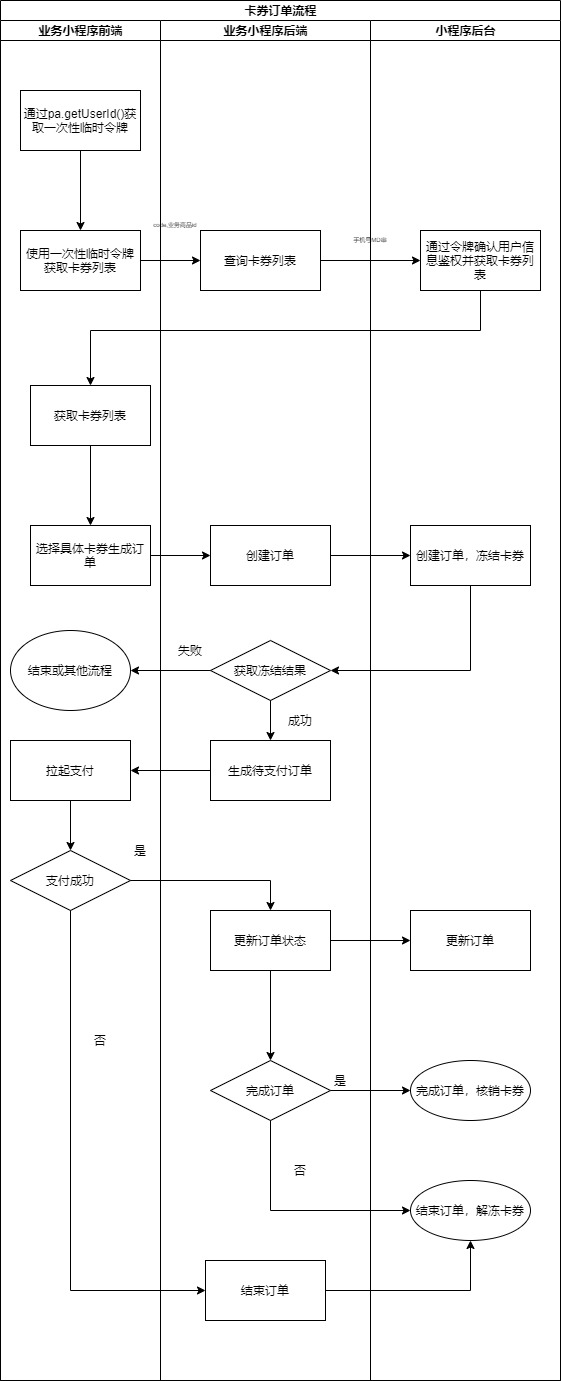
简要流程
如上图所示,开发者主要操作步骤:
- 开发这根据订单的不同状态调用不同的接口完成订单状态更新。
流程图如下所示:
这是一个 HTTPS 接口,开发者通过后台服务器从小程序开放平台完成订单相关流程信息。
为了保证数据安全,开发者需要使用 RSA 密钥进行身份认证,RSA 密钥可以从小程序开放平台如下入口获取: 开发中心 -> 你的小程序 -> 基础信息 -> 小程序密钥
在完成上线全部流程前只能通过测试环境接口方式联调,完成上线流程后需再切换为生产环境接口地址。其中调用测试接口联调时需要提供手机号和设备号给产险开发添加测试数据
令牌接口地址
在完成业务接口调用前需要调用访问令牌接口获取access_token,获取到的acess_token在调用业务接口是放到url后面。
测试地址
POST https://test-api.pingan.com.cn:20443/oauth/oauth2/access_token
生产地址
POST https://api.pingan.com.cn/oauth/oauth2/access_token
请求参数
具体入参值可找产险开发老师获取。
| 传值方式 | 参数值 | |
|---|---|---|
| client_id | POST 请求 | 应用ID 例如:P_PA002_ELIS_UWS(在“我的应用”列表中) |
| grant_type | POST 请求 | 授权类型 固定值:client_credentials |
| client_secret | POST 请求 | 应用密钥 例如:znD5x4d1(创建应用时返回的应用密码) |
响应参数
| access_token | oauth系统对获取access_token有调用限制,请将获取的token值放到本地缓存;注意token是有有效期的,当token失效时需要做相应处理。 |
|---|---|
| expires_in | 有效期 例如 :60 (单位:分钟);0表示永久有效;expires_in只是有效期参考,不以这个为唯一更新token的标准。注意调用接口返回13002和13012的错误码必须处理。 |
| openid | openid |
具体指引链接:https://api.pingan.com.cn/dev/index.do?bAPhdWDKZYpPM00
创建订单接口地址
request_id只要每个请求传的值不一样就可以,建议传时间戳毫秒数。
测试地址
POST https://test-api.pingan.com.cn:20443/open/mina-store/api/developer/order/createOrder?access_token=C89B2C0D6A4D4262B17CD7DC1EC05E11&request_id=123451
生产地址
POST https://api.pingan.com.cn/open/mina-store/api/developer/order/createOrder?access_token=C89B2C0D6A4D4262B17CD7DC1EC05E11&request_id=123451
Headers
| 参数名称 | 参数值 | 是否必须 | 备注 |
|---|---|---|---|
| Content-Type | application/json | 是 | |
| X-MINA-MINI-APP-ID | 是 | 小程序ID | |
| X-MINA-TIMESTAMP | 是 | 请求时间(毫秒级) | |
| X-MINA-SIGN | 是 | 请求签名, 签名有效时间 60 秒, 采用 RSA 算法, 签名结果使用 Base64 进行编码;签名格式: RSA(requestBodyString + X-MINA-MINI-APP-ID + X-MINA-TIMESTAMP) |
请求参数
| 名称 | 类型 | 是否必须 | 名称 | 备注 |
|---|---|---|---|---|
| miniAppId | string | 是 | 小程序ID | 小程序ID,可从端能力getSystemInfo获取 |
| businessNo | string | 否 | 商家编码 | 商家编码,一般只有一个商户,不用传值;多商户时根据不同场景必须传对应的商家编码获取对应商户卡券列表。该值由平安配置提供 |
| openId | string | 是 | 登入后可获得 | |
| mobile | string | 否 | 用户手机号码 | 保留字段,不用传。用户手机号码 sm4加密 |
| pOrderId | string | 是 | 商家订单号 | 商家订单号 |
| businessOrderType | string | 是 | 商家订单类型 | 默认传default,如果商家需要在统一订单界面展示多个不通种类的订单界面则需要配置多种订单类型 |
| businessOrderStatus | string | 是 | 商家订单状态 | 主要用来将状态传递给统一订单,小程序会维护一套映射关系 |
| payAmount | string | 是 | 订单实付金额 | profitAmout+cashAmout订单实付金额 |
| cashAmout | string | 是 | 支付的现金金额 | 支付的现金金额 |
| profitAmout | string | 是 | 权益抵扣金额 | 权益抵扣金额 ,没有卡券时候传0 |
| discountAmout | string | 是 | 优惠金额 | 一般为业务方自己确定的优惠金额 |
| totalAmount | string | 是 | 订单总金额 | 订单总金额(单位:元 精确到分payAmount+discountAmout),没有卡券时候传0 |
| zeroCash | string | 否 | 零元现金标识 | "N":非零元现金业务;“Y”:可用于下单生成零元现金的订单(无卡券且现金金额为0) |
| vassOrderContentExtend | Map |
否 | 服管相关拓展字段 | 服管相关拓展字段 |
| orderStartTime | string | 是 | 订单创建时间 | 订单创建时间 yyyy-MM-dd HH:mm:ss |
| productCode | string | 是 | 订单中的商品编码 | 订单中的商品编码(在同一订单中显示),并映射服管商品编码;或者直接传卡券对应的商品编码 |
| productName | string | 是 | 订单中的商品名称 | 订单中的商品名称(在同一订单中显示) |
| itemNum | string | 是 | 订单中的商品数量(在同一订单中显示) | 订单中的商品数量(在同一订单中显示) |
| picPath | string | 否 | 商品图片 | 图片链接 如果为空,展示兜底图片 |
| isPresent | string | 是 | 是否是赠品 | 0:否,1:是 |
| itemDetail | JSONObject | 否 | 商品明细 | 详情见:好车主中订单展示 |
| unifyOrderContentExtend | Map |
否 | 统一订单相关拓展字段 | 拓展字段(业务方特有字段),统一订单中如需自定义展示需要该字段 |
| usedProfitType | string | 是 | 是否使用权益(包括卡券和礼包) | 0:不使用 1:使用卡券 2:使用礼包 |
| idProfitItem | string | 否 | 使用的卡券实例id | 使用的卡券实例id |
| encryptedProfitInfo | string | 否 | 卡券详情 | 使用的卡券详细信息。 我们会传给你的卡券列表信息,蜜蜂选中卡券后,将卡券新信息回传给我们即可 |
Tips: 所有字段均不为负数 单位:元 精确到分 cashAmout = 实际付款 payAmount = profitAmout + cashAmout profitAmout = 卡券金额(使用卡券,金额不为0) discountAmout = 商家自身优惠金额 totalAmount = payAmount+discountAmout 例子:比如你去全家,要50快,然后有个10元全家券,所以只需要40,但是微信支付的时候,说给你优惠,再减10快,最终是30快 所以 profitAmout是10(卡券),discountAmout = 10 (供应商优惠),cashAmout = 30 现金,payAmount = 40, totalAmount = 50
响应参数
| 名称 | 类型 | 是否必须 | 默认值 | 备注 |
|---|---|---|---|---|
| responseCode | string | 是 | 默认0为成功 | |
| responseMsg | string | 否 | 提示信息 |
其他接口地址
更新订单测试地址
POST https://test-api.pingan.com.cn:20443/open/mina-store/api/developer/order/updateOrder?access_token=C89B2C0D6A4D4262B17CD7DC1EC05E11&request_id=123451
更新订单生产地址
POST https://api.pingan.com.cn/open/mina-store/api/developer/order/updateOrder?access_token=C89B2C0D6A4D4262B17CD7DC1EC05E11&request_id=123451
完成订单测试地址
POST https://test-api.pingan.com.cn:20443/open/mina-store/api/developer/order/finishOrder?access_token=C89B2C0D6A4D4262B17CD7DC1EC05E11&request_id=123451
完成订单生产地址
POST https://api.pingan.com.cn/open/mina-store/api/developer/order/finishOrder?access_token=C89B2C0D6A4D4262B17CD7DC1EC05E11&request_id=123451
取消订单测试地址
POST https://test-api.pingan.com.cn:20443/open/mina-store/api/developer/order/cancelOrder?access_token=C89B2C0D6A4D4262B17CD7DC1EC05E11&request_id=123451
取消订单生产地址
POST https://api.pingan.com.cn/open/mina-store/api/developer/order/cancelOrder?access_token=C89B2C0D6A4D4262B17CD7DC1EC05E11&request_id=123451
退还卡券测试地址
POST https://test-api.pingan.com.cn:20443/open/mina-store/api/developer/order/returnCoupon?access_token=C89B2C0D6A4D4262B17CD7DC1EC05E11&request_id=123451
退还卡券生产地址
POST https://api.pingan.com.cn/open/mina-store/api/developer/order/returnCoupon?access_token=C89B2C0D6A4D4262B17CD7DC1EC05E11&request_id=123451
Headers
| 参数名称 | 参数值 | 是否必须 | 备注 |
|---|---|---|---|
| Content-Type | application/json | 是 | |
| X-MINA-MINI-APP-ID | 是 | 小程序ID | |
| X-MINA-TIMESTAMP | 是 | 请求时间 | |
| X-MINA-SIGN | 是 | 请求签名, 签名有效时间 60 秒, 采用 RSA 算法, 签名结果使用 Base64 进行编码;签名格式: RSA(requestBodyString + X-MINA-MINI-APP-ID + X-MINA-TIMESTAMP) |
请求参数
| 名称 | 类型 | 是否必须 | 名称 | 备注 |
|---|---|---|---|---|
| miniAppId | string | 是 | 小程序ID | 小程序ID,可从端能力getSystemInfo获取 |
| businessNo | string | 否 | 商家编码 | 商家编码,一般只有一个商户,不用传值;多商户时根据不同场景必须传对应的商家编码获取对应商户卡券列表。该值由平安配置提供 |
| openId | string | 是 | ||
| mobile | string | 否 | 用户手机号码 | 保留字段,暂时不用传。用户手机号码 sm4加密 |
| pOrderId | string | 是 | 商家订单号 | 商家订单号 |
| businessOrderType | string | 是 | 商家订单类型 | 根据商家业务进行传递,如果商家需要在统一订单界面展示多个不通种类的订单界面则需要配置多种订单类型 |
| businessOrderStatus | string | 是 | 商家订单状态 | 主要用来将状态传递给统一订单,小程序会维护一套映射关系 |
| payAmount | string | 是 | 订单实付金额 | 订单实付金额 |
| cashAmout | string | 是 | 支付的现金金额 | 支付的现金金额 |
| profitAmout | string | 是 | 权益抵扣金额 | 权益抵扣金额,没有卡券时候传0 |
| discountAmout | string | 是 | 优惠金额 | 优惠金额 |
| totalAmount | string | 是 | 订单总金额 | 订单总金额(单位:元 精确到分payAmount+discountAmout) |
| vassOrderContentExtend | Map |
否 | 服管相关拓展字段 | 拓展字段 |
| orderStartTime | string | 是 | 订单创建时间 | 订单创建时间 yyyy-MM-dd HH:mm:ss |
| orderFinishTime | string | 是 | 订单完成时间 | 订单结束时间 yyyy-MM-dd HH:mm:ss |
| productCode | string | 是 | 订单中的商品编码 | 订单中的商品编码(在同一订单中显示),并映射服管商品编码;或者直接传卡券对应的商品编码 |
| productName | string | 是 | 订单中的商品名称 | 订单中的商品名称 |
| itemNum | string | 是 | 订单中的商品数量(在同一订单中显示) | 订单中的商品数量 |
| picPath | string | 是 | 商品图片 | 图片链接 如果为空,展示兜底图片 |
| isPresent | string | 是 | 是否是赠品 | 0:否,1:是 |
| itemDetail | JSONObject | 是 | 商品明细 | 详情见:好车主中订单展示 |
| unifyOrderContentExtend | Map |
否 | 统一订单相关拓展字段 | 拓展字段(业务方特有字段) |
响应参数
| 名称 | 类型 | 是否必须 | 默认值 | 备注 |
|---|---|---|---|---|
| responseCode | string | 是 | 默认0为成功 | |
| responseMsg | string | 否 | 提示信息 |
切换支付接口地址
切换支付方式 生产地址
POST https://test-api.pingan.com.cn:20443/open/mina-store/api/developer/order/switchPayType?access_token=C89B2C0D6A4D4262B17CD7DC1EC05E11&request_id=123451
切换支付方式 生产地址
POST https://api.pingan.com.cn/open/mina-store/api/developer/order/switchPayType?access_token=C89B2C0D6A4D4262B17CD7DC1EC05E11&request_id=123451
Headers
| 参数名称 | 参数值 | 是否必须 | 备注 |
|---|---|---|---|
| Content-Type | application/json | 是 | |
| X-MINA-MINI-APP-ID | 是 | 小程序ID | |
| X-MINA-TIMESTAMP | 是 | 请求时间(毫秒级) | |
| X-MINA-SIGN | 是 | 请求签名, 签名有效时间 60 秒, 采用 RSA 算法, 签名结果使用 Base64 进行编码;签名格式: RSA(requestBodyString + X-MINA-MINI-APP-ID + X-MINA-TIMESTAMP) |
请求参数
| 名称 | 类型 | 是否必须 | 名称 | 备注 |
|---|---|---|---|---|
| miniAppId | string | 是 | 小程序ID | 小程序ID,可从端能力getSystemInfo获取 |
| businessNo | string | 否 | 商家编码 | 商家编码,一般只有一个商户,不用传值;多商户时根据不同场景必须传对应的商家编码获取对应商户卡券列表。该值由平安配置提供 |
| openId | string | 是 | ||
| pOrderId | string | 是 | 商家订单号 | 商家订单号 |
| businessOrderType | string | 是 | 商家订单类型 | 根据商家业务进行传递,如果商家需要在统一订单界面展示多个不通种类的订单界面则需要配置多种订单类型 |
| businessOrderStatus | string | 是 | 商家订单状态 | 主要用来将状态传递给统一订单,小程序会维护一套映射关系 |
| payAmount | string | 是 | 订单实付金额 | 订单实付金额 |
| cashAmout | string | 是 | 支付的现金金额 | 支付的现金金额 |
| profitAmout | string | 是 | 权益抵扣金额 | 权益抵扣金额,没有卡券时传0 |
| discountAmout | string | 是 | 优惠金额 | 优惠金额 |
| totalAmount | string | 是 | 订单总金额 | 订单总金额(单位:元 精确到分payAmount+discountAmout) |
| orderStartTime | string | 是 | 订单创建时间 | 订单创建时间 yyyy-MM-dd HH:mm:ss |
| orderFinishTime | string | 是 | 订单完成时间 | 订单创建时间 yyyy-MM-dd HH:mm:ss |
| productCode | string | 是 | 订单中的商品编码 | 订单中的商品编码(在同一订单中显示),并映射服管商品编码;或者直接传卡券对应的商品编码 |
| productName | string | 是 | 订单中的商品名称 | 订单中的商品名称 |
| itemNum | string | 是 | 订单中的商品数量(在同一订单中显示) | 订单中的商品数量 |
| picPath | string | 是 | 商品图片 | 图片链接 如果为空,展示兜底图片 |
| isPresent | string | 是 | 是否是赠品 | 0:否,1:是 |
| itemDetail | JSONObject | 是 | 商品明细 | 详情见:好车主中订单展示 |
| idProfitItem | string | 否 | 商品明细 | 卡券实例id |
| giftItemId | string | 否 | 商品明细 | 礼包实例id |
| equipmentNo | string | 否 | 商品明细 | 设备号 |
| couponSource | string | 否 | 商品明细 | 1:团体卡券 |
响应参数
| 名称 | 类型 | 是否必须 | 默认值 | 备注 |
|---|---|---|---|---|
| responseCode | string | 是 | 默认0为成功 | |
| responseMsg | string | 否 | 提示信息 |
好车主中订单展示:itemDetail传值
| 变量名 | 字段名称 | 类型 | 是否必须 | 示例 | 说明 |
|---|---|---|---|---|---|
| picPathMessage | 图片标题文案 | String | 否 | 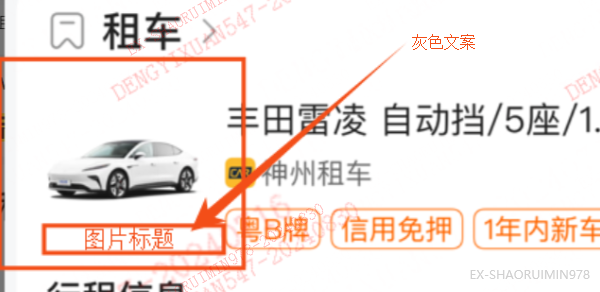 |
图片标题:业务传入文案,限制6个字,超出截断 |
| normalMsg | 外露字段类型1:(纯文案信息+常规) | List<Object> | 否 | "normalMsg":[{"itemSequence":12,"itemValue":"}神州租车"},{"itemSequence":13,"itemValue":"小黄租车"}]</br>itemValue(String) :外露文案</br>itemSequence (Long) :外露顺序 值越小的,展示在最上面 | 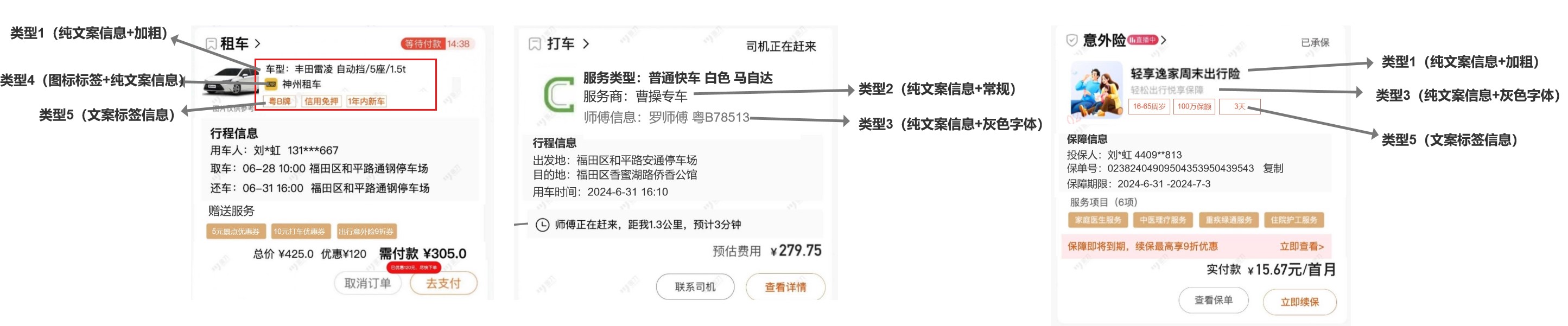 |
| normalGrayMsg | 外露字段类型2:(纯文案信息+灰色字体) | List<Object> | 否 | "normalGrayMsg":[{"itemSequence":12,"itemValue":"神州租车"},{"itemSequence":13,"itemValue":"小黄租车"}] </br>itemValue(String) :外露文案 </br>itemSequence (Long) :外露顺序 值越小的,展示在最上面 | |
| normalImgMsg | 外露字段类型3:(图标标签+纯文案信息) | List<Object> | 否 | "normalImgMsg":[{"itemSequence":12,"itemValue":"${图片链接}神州租车"},{"itemSequence":13,"itemValue":"${图片链接}小黄租车"}] </br>itemValue(String) :外露文案 </br>itemSequence (Long) :外露顺序 值越小的,展示在最上面</br>${图片链接}:用于存放图片链接 | |
| normalLabelMsg | 外露字段类型4:(文案标签信息) | List<Object> | 否 | "normalLabelMsg":[{"itemValue":"粤B牌"},{"itemValue":"信用免押,一年内新车"}]</br>itemValue(String) :外露标签文案 ,按照英文逗号分割 , 默认最底层展示 | |
| serviceKeyMsg | 服务重要信息区 | Map<String,Object> </br>keyTitle:标题</br>msgList:List类型 (订单侧按列表的顺序展示) | 否 | {"keyTitle":"行程信息","msgList":["取车时间:06.28 10:00 福田区金融中心","还车时间:06.29 10:00 福田区金融中心"]} | 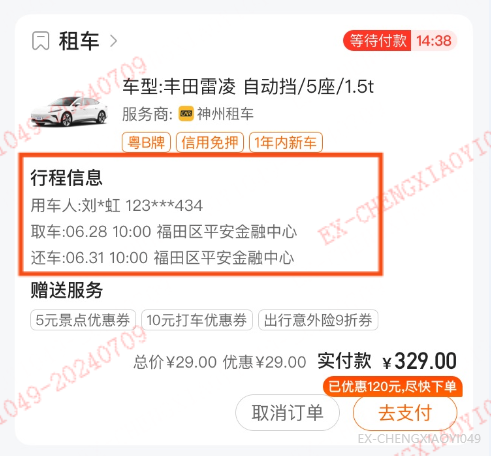 |
| serviceProjectMsg | 服务项目区 | Map<String,Object> </br>keyTitle:标题</br>msgList:List类型 (订单侧按列表的顺序展示) | 否 | {"keyTitle":"赠送服务","msgList":["5元优惠卷"," 打车优惠卷"]} | 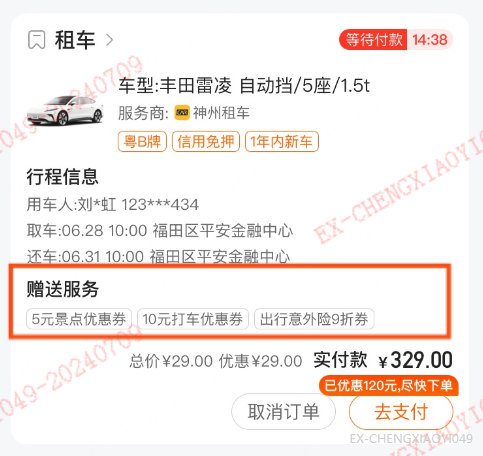 |
| productImgUrl | 商品标签链接 | String | 否 |  |
参考传值: "itemDetail": {"normalMsg":[{"itemSequence":1,"itemValue":"订单名称"}],"normalGrayMsg":[{"itemSequence":2,"itemValue":"订单简介"}],"serviceKeyMsg":{"keyTitle":"订单信息","msgList":["预定日期:2024-09-11 09:00:00 深圳湾","出行日期:2024-09-13 09:00:00 深圳湾","联系人:小叔叔 188**0366 Zhangke@pingan.com.cn"]}}
代码示例
示例代码(前端 vue):
export default {
  name: "login",
  data() {
    return {
      ...
    }
  },
  methods: {
    // 判断当前是否登录
    isHostLoginFn() {
      PAMINA.call('isHostLogin', (res) => {
          console.log(res);
        }, (e) => {
          console.log(e);
      });
    },
    // 打开登录页,如果已经登录,该端能力返回登录成功信息
    appLoginFn() {
      PAMINA.call('appLogin', (res) => {
          console.log(res);
        }, (e) => {
          console.log(e);
      });
    },
    // 获取用户的ID信息
    getUserId() {
      PAMINA.call('getUserId', (res) => {
          console.log(res);

          // 成功获取查询令牌之后,调用后台兑换用户 openId 等信息并完成登录
          // 此处代码略

        }, (e) => {
          console.log(e);
      });
    }
  }
}
示例代码(后端 java):生成签名
import org.apache.commons.codec.binary.Base64;


/**
 * 生成签名
 * @param base64PrivateKey base64格式的 RSA 私钥
 * @param content 需要签名的内容
 * @return 签名传
 */
public static String signBySHA256withRSA(String base64PrivateKey, String content) {
    try {

        PKCS8EncodedKeySpec pkcs8EncodedKeySpec = new PKCS8EncodedKeySpec(Base64.decodeBase64(base64PrivateKey));
        KeyFactory keyFactory = KeyFactory.getInstance("RSA");
        PrivateKey privateKey = keyFactory.generatePrivate(pkcs8EncodedKeySpec);

        Signature signature = Signature.getInstance("SHA256withRSA");
        signature.initSign(privateKey);
        signature.update(content.getBytes());

        return Base64.encodeBase64String(signature.sign());
    } catch (Exception e) {
        logger.error("SHA256withRSA is error:{}",e.getMessage());
    }
    return null;
}

public static void main(String[] args) {
    // 请求的body
    String requestBody="{\"miniAppId\":\"cxec681d79635042d7\",\"identityCode\":\"dn67tajk0fsx4aa\",\"deviceId\":\"h09e9fbeae0118d69872ed90c84feaea3\"}";

    // 你的私钥, 从开放平台获取
    String privateKey="yourRsaPrivateBy";

    // 生成 rsa 签名
    String base64Sign = signBySHA256withRSA(privateKey, content);
    System.out.println(base64Sign);
}
示例代码(后端 java):SM4加密手机号
    /**
     * 国密-对称加密
     *
     * @param data
     * @param privateKey
     * @return
     * @throws Exception
     */
    public static String sm4Encode(String data, String privateKey) {
        try {
            SM4 sm4 = new SM4(privateKey);
            return sm4.encryptHex(data);
        } catch (Exception e) {
            log.error("sm4Encode异常", e);
        }
        return null;
    }

    /**
     * 国密-对称解密
     *
     * @param data
     * @param privateKey
     * @return
     * @throws Exception
     */
    public static String sm4Decode(String data, String privateKey) {
        try {
            SM4 sm4 = new SM4(privateKey);
            return sm4.decryptHex(data);
        } catch (Exception e) {
            log.error("sm4Decode异常", e);
        }
        return null;
    }
package com.pingan.property.icore.apps.applets.support.util.sm;

import org.bouncycastle.pqc.math.linearalgebra.ByteUtils;
import org.bouncycastle.util.encoders.Base64;

import java.util.regex.Pattern;

/**
 * @author WUDELAI672
 * @date 2021/5/26 15:31
 */
public class ToolsUtil {
    private static final Pattern hexPattern = Pattern.compile("^[a-f0-9]+$", 2);

    public ToolsUtil() {
    }

    public static boolean isHex(CharSequence value) {
        return null == value ? false : hexPattern.matcher(value).matches();
    }

    public static byte[] decode(String str) {
        if (null == str) {
            return null;
        } else {
            return isHex(str) ? hexStrToByte(str) : Base64.decode(str);
        }
    }

    public static String hexStrToBase64(String hexStr) {
        return Base64.toBase64String(hexStrToByte(hexStr));
    }

    public static String base64ToHexStr(String base64Str) {
        return ByteUtils.toHexString(Base64.decode(base64Str));
    }

    public static byte[] hexStrToByte(String hexStr) {
        if (null != hexStr && hexStr.length() != 0) {
            char[] hexData = hexStr.toCharArray();
            int len = hexData.length;
            if ((len & 1) != 0) {
                throw new RuntimeException("Odd number of characters.");
            } else {
                byte[] out = new byte[len >> 1];
                int i = 0;

                for(int j = 0; j < len; ++i) {
                    int f = toDigit(hexData[j], j) << 4;
                    ++j;
                    f |= toDigit(hexData[j], j);
                    ++j;
                    out[i] = (byte)(f & 255);
                }

                return out;
            }
        } else {
            return null;
        }
    }

    public static byte[] hexStrToByteAndAdd0x04(String hexStr) {
        if (null != hexStr && hexStr.length() != 0) {
            char[] hexData = hexStr.toCharArray();
            int len = hexData.length;
            if ((len & 1) != 0) {
                throw new RuntimeException("Odd number of characters.");
            } else {
                boolean needAdd = '0' != hexData[0] || '4' != hexData[1];
                int outLen = needAdd ? (len >> 1) + 1 : len >> 1;
                byte[] out = new byte[outLen];
                if (needAdd) {
                    out[0] = 4;
                }

                int i = needAdd ? 1 : 0;

                for(int j = 0; j < len; ++i) {
                    int f = toDigit(hexData[j], j) << 4;
                    ++j;
                    f |= toDigit(hexData[j], j);
                    ++j;
                    out[i] = (byte)(f & 255);
                }

                return out;
            }
        } else {
            return null;
        }
    }

    private static int toDigit(char ch, int index) {
        int digit = Character.digit(ch, 16);
        if (digit == -1) {
            throw new RuntimeException("Illegal hexadecimal character " + ch + " at index " + index);
        } else {
            return digit;
        }
    }
}
 package com.pingan.property.icore.apps.applets.support.util.sm;

import lombok.extern.slf4j.Slf4j;
import org.bouncycastle.crypto.CryptoException;
import org.bouncycastle.jce.provider.BouncyCastleProvider;
import org.bouncycastle.pqc.math.linearalgebra.ByteUtils;
import org.bouncycastle.util.encoders.Base64;

import javax.crypto.Cipher;
import javax.crypto.KeyGenerator;
import javax.crypto.SecretKey;
import javax.crypto.spec.IvParameterSpec;
import javax.crypto.spec.SecretKeySpec;
import java.io.UnsupportedEncodingException;
import java.security.NoSuchAlgorithmException;
import java.security.SecureRandom;
import java.security.Security;

/**
 * 国密SM4算法
 */
@Slf4j
public class SM4 {
    public static final String ALGORITHM_NAME = "SM4";
    private static final String ENCODING = "UTF-8";
    private SecretKey secretKey;
    private Cipher cipher;
    private IvParameterSpec ivParams;

    public SM4(String key) {
        this(Mode.ECB, Padding.PKCS5Padding, (String) key, (String) null);
    }

    public SM4(Mode mode, Padding padding, String key, String iv) {
        this(mode, padding, ToolsUtil.decode(key), ToolsUtil.decode(iv));
    }

    public SM4(Mode mode, Padding padding, byte[] key, byte[] iv) {
        try {
            String algorithmName = "SM4/" + mode.name() + "/" + padding.name();
            this.cipher = Cipher.getInstance(algorithmName, "BC");
        } catch (Exception var6) {
            throw new RuntimeException(var6);
        }

        this.secretKey = new SecretKeySpec(key, "SM4");
        this.ivParams = null;
        if (null != iv) {
            this.ivParams = new IvParameterSpec(iv);
        }

    }

    public static String generateKeyBase64() {
        return Base64.toBase64String(generateKey());
    }

    public static String generateKeyHex() {
        return ByteUtils.toHexString(generateKey()).toUpperCase();
    }

    public static byte[] generateKey() {
        try {
            KeyGenerator keyGenerator = KeyGenerator.getInstance("SM4");
            keyGenerator.init(128, new SecureRandom());
            return keyGenerator.generateKey().getEncoded();
        } catch (NoSuchAlgorithmException var1) {
            log.error("generateKey failed: {}", var1.toString());
            return null;
        }
    }

    public String encryptBase64(String data) throws CryptoException, UnsupportedEncodingException {
        return Base64.toBase64String(this.encrypt(data.getBytes("UTF-8")));
    }

    public String encryptHex(String data) throws CryptoException, UnsupportedEncodingException {
        return ByteUtils.toHexString(this.encrypt(data.getBytes("UTF-8"))).toUpperCase();
    }

    public byte[] encrypt(byte[] data) throws CryptoException {
        try {
            if (null != this.ivParams) {
                this.cipher.init(1, this.secretKey, this.ivParams);
            } else {
                this.cipher.init(1, this.secretKey);
            }

            return this.cipher.doFinal(data);
        } catch (Exception var3) {
            throw new CryptoException(var3.getMessage(), var3);
        }
    }

    public String decryptBase64(String cipherBase64) throws CryptoException, UnsupportedEncodingException {
        return new String(this.decrypt(Base64.decode(cipherBase64)), "UTF-8");
    }

    public String decryptHex(String cipherHex) throws CryptoException, UnsupportedEncodingException {
        return new String(this.decrypt(ToolsUtil.hexStrToByte(cipherHex)), "UTF-8");
    }

    public byte[] decrypt(byte[] data) throws CryptoException {
        try {
            if (null != this.ivParams) {
                this.cipher.init(2, this.secretKey, this.ivParams);
            } else {
                this.cipher.init(2, this.secretKey);
            }

            return this.cipher.doFinal(data);
        } catch (Exception var3) {
            throw new CryptoException(var3.getMessage(), var3);
        }
    }

    static {
        if (Security.getProvider("BC") == null) {
            Security.addProvider(new BouncyCastleProvider());
        }
    }

    public static enum Padding {
        NoPadding, PKCS5Padding, ISO10126Padding, ZeroBytePadding, PKCS7Padding;
    }

    public static enum Mode {
        ECB, CBC, CFB, OFB, CTR;
    }
}